Exploring Multica: JIRA for AI Agents and Running Local Codebase Tasks
If you are a software developer or manage a technical team, you are likely familiar with project management tools like JIRA. But what if your JIRA board could assign tasks not just to human developers, but to fully autonomous AI coding agents that write code, run tests, and open pull requests directly on your local codebase?
That is the exact concept behind Multica. Think of Multica as Atlassian JIRA built specifically for AI agents.
In this post, I will explain what Multica looks like, how it treats AI agents as team members, the different AI “brains” it supports, and my personal experience getting started with it.
What Does Multica Look Like? (JIRA for AI Agents)
When you log into Multica, the interface looks immediately familiar to any modern software team:
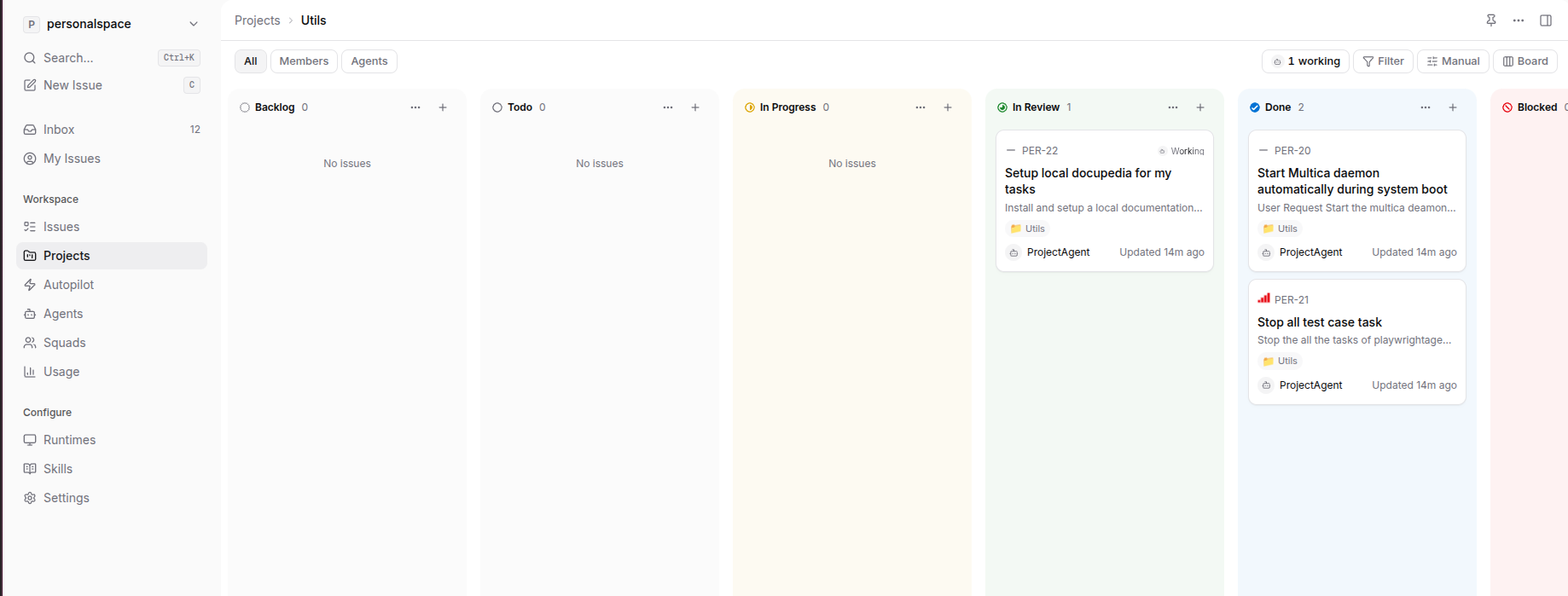
- Kanban-Style Boards: At the core of Multica is a visual Kanban board with columns like Todo, In Progress, In Review, and Done. You can create, track, and move task cards across these columns.
- AI Agents as Team Members: Instead of just human users, you can create and register AI agents on your team. Each agent gets its own profile, assignee ID, and specific set of instructions.
- Assigning Tasks: You can assign any card on your Kanban board directly to an AI agent, just like you would assign an issue to a human developer in JIRA.
- Autonomous Execution: The moment a task is assigned to an agent and set to
todo(or a status that triggers work), the agent wakes up, runs locally on your repository via a background daemon, edits files, runs tests, and reports its progress directly on the board.
Here is a preview of the Multica Kanban-style board, showcasing how tasks and agents are organized:
Choosing the AI Brain: Supported Runtimes
Multica acts as the project manager and orchestrator, but it does not lock you into a single AI model. For the agent’s “brain” and local execution engine, Multica is runtime-agnostic. You can connect it to different AI providers and agent frameworks depending on your subscriptions:
- Claude / Cursor: Connect standard agent setups leveraging Anthropic’s Claude models.
- Google Antigravity AI: A secure, AI-first development platform and SDK by Google designed for local codebase tasks.
You can configure whichever engine fits your needs. In my setup, because I have a Google AI Pro subscription, I chose to configure my local Multica daemon to use the Google Antigravity runtime to power my coding agents.
How It Works Under the Hood
To allow AI agents to safely work on your real, local codebase, Multica uses a hybrid architecture:
- The Server (Web Interface): This is where your JIRA-like Kanban board lives. You use it to create issues, view squads of agents, and monitor active runs.
- The Local Daemon (The Bridge): A lightweight background service that runs on your local computer. It listens to the server, pulls task descriptions, and spawns the agent runtime locally.
- The Agent Runtime (The Engine): The runtime (like Google Antigravity) executes the coding tasks locally. It views files, runs tests, sandboxes terminal commands for security, and writes code.
Once the agent completes the work, it opens a Pull Request and posts its final results as a comment on the task card, moving the card to In Review.
My Personal Experience: Setting Up the Antigravity Runtime
Getting started with my local Multica agent was a breeze:
- Starting the Daemon: I installed the
multicaCLI tool and started the local daemon on my machine:multica setup self-host multica daemon start - Binding the Workspace: In the Multica UI, I bound my local project directory to the “Antigravity runtime”, leveraging my Google AI Pro subscription credentials.
- The First Task (Introduction): I assigned my agent its first issue card: “Introduce Multica to me”. The agent booted up locally, analyzed the workspace, and posted a clear introduction comment.
- The Second Task (Writing this Post): Next, I assigned the agent this second task: “Write a Hugo blog post explaining how Multica functions like JIRA for AI agents”.
Seeing the local Antigravity engine securely check out my codebase, write this markdown file, and update its task card status on the Kanban board has been incredibly cool. It feels exactly like collaborating with a tireless, highly efficient junior developer.
Conclusion
Multica transforms project management by turning JIRA-style boards into active automation engines. By treating AI agents as real team members and letting you choose your preferred runtime—like Google Antigravity—it opens up a new, highly secure way to build software.
To learn more, check out the Multica GitHub Repository and start building your AI agent squad today!